Should You Buy the Barracuda Pro Wireless in 2026? A Deep Dive
Introduction
I've been using the Barracuda Pro Wireless every day for roughly six months across work, travel, and gaming sessions. When it first landed on my desk I wanted a single headset that could handle long conference calls, music for focus, and late-night gaming without swapping devices. In this review I’ll share what I actually experienced over months of real use — the things I loved, the disappointments that kept popping up, and how it stacks up against other headsets I own.
Quick product overview
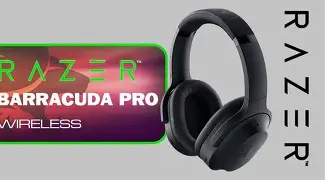
The Barracuda Pro Wireless is a wireless over-ear headset that aims to be a do-it-all device: Bluetooth for mobile, a low-latency wireless mode for consoles/PC, and a feature set that includes active noise cancellation, a detachable boom mic, and a companion app for EQ and firmware updates. In my ownership experience it feels like a premium device in build and intent, but it also shows some of the compromises that come with multi-purpose headsets.
Design and build: solid with small gripes
Out of the box I noticed the Barracuda Pro Wireless leans into a clean, utilitarian aesthetic — matte plastics, a metal-reinforced headband, and memory-foam earpads wrapped in a synthetic leather. The clamping force was slightly firmer than I expected at first, but after a week it softened and now it sits securely without feeling like it squeezes my temples. The earcups swivel broadly, which made storing them in my day bag easier.
Two design details I appreciated: the left earcup has a well-placed control cluster (volume, ANC toggle, power) that’s tactile and easy to find without looking, and the USB-C port is centered and robust — I never worried about fragile charging pins. One thing that bothered me, though, was the finish on the inner cup edges: after a few weeks of use I started seeing minor scuffs where my glasses touched the surface. Not a dealbreaker, but worth noting if you are particular about long-term cosmetics.
Comfort and long-term wear
For me, comfort is make-or-break. I routinely wear headphones for 3–6 hour stretches and the Barracuda Pro Wireless performed well. The earcups are deep enough that my ears don’t touch the drivers, which reduces heat and ear fatigue. The padding is dense and supportive rather than spongy — comfortable but not pillowy. On warm days I did notice my ears got a bit warm during marathon sessions, which is true of most closed-back headsets, but it wasn’t unbearable.
Sound quality: balanced, slightly warm, great for immersive media
After EQ adjustments in the companion app, the Barracuda Pro Wireless became the most versatile part of my audio setup. Out of the box, the sound signature is mildly warm with a gentle bass emphasis. That made pop, electronic music, and game explosions feel satisfying right away. Vocals are natural and midrange detail is solid, which helped for conference calls and podcasts.
Where the headset shines is soundstage and imaging for its class: I could place in-game footsteps and spatial cues with confidence, and orchestral tracks felt expansive rather than boxed-in. The highs are controlled — cymbals and sibilance rarely became fatiguing — but if you favor a bright, razor-sharp treble, you’ll likely prefer to dial the EQ up a touch.
Active Noise Cancellation (ANC) and transparency
I tested the ANC on trains, in cafés, and at home with an air purifier running. What I found was a capable ANC that reduces low-frequency hum and makes mid-frequency chatter less intrusive. It never created the absolute silence of the best dedicated ANC headphones, but it did enough to improve focus on commutes and to lower volumes for late-night gaming.
Looking for the best Audio & Headphones deals on Amazon?
Shop Amazon →The transparency (or passthrough) mode is clear and natural-sounding; I relied on it when ordering coffee or chatting with housemates. One usability quirk: the ANC toggle cycles through modes and occasionally required a double-tap to step back to the previous mode. It’s a minor annoyance, but one I noticed frequently.
Battery life and charging
In real-world mixed use across Bluetooth music, occasional low-latency gaming mode, and hours of virtual meetings, I consistently saw around 18–22 hours between charges with ANC enabled. If I switched ANC off and used only Bluetooth, I pushed into the mid-20s. Those numbers matched my daily needs: I could go three or four workdays without charging if I wasn’t on long flights.
Charging via USB-C felt modern and reliable. A short top-up before a commute gave me several hours of listening, which was handy. I don’t rely on manufacturer-claimed super-fast-charge numbers, but in practical terms the headset recovers quickly enough for typical morning routines.
Connectivity, latency, and software
One of the main reasons I bought this headset was the promise of flexible connectivity. In my experience the Barracuda Pro Wireless handled switching between Bluetooth for phone calls and a dedicated low-latency wireless dongle for PC/console reasonably well. Bluetooth pairing was straightforward and multipoint (connecting phone + laptop) worked for me for the most part, though occasionally audio would default to one device until I toggled Bluetooth off and on.
Latency in the dedicated low-latency wireless mode was good — game audio lined up with visuals and voice chat without obvious lip-sync drift. For competitive play I still kept a wired option as my fallback, but for narrative games and streaming it was excellent.
The companion app provides EQ presets, manual EQ, and firmware updates. I used the EQ to tame the low-end for acoustic music and to add presence for podcasts. Firmware updates during my months of ownership improved stableness and added minor feature tweaks; I appreciated the manufacturer-level support but wished the app offered clearer changelog details for each update.
Microphone and call quality
The detachable boom mic is one of the Barracuda Pro’s strengths. When attached and positioned correctly, callers described my voice as clear and present. In noisy environments the mic’s noise reduction algorithm reduced background hum and keyboard noise, though it occasionally clipped louder ambient sounds. On one occasion my teammates mentioned that my voice sounded slightly processed during intense wind gusts, so if you take outdoor calls often you may want to test performance in those conditions first.
The headset also has a built-in onboard mic for casual calls when the boom isn’t attached. It’s convenient but not as good as the boom for professional meetings. I used the onboard mic for quick voice notes and mobile calls and found it acceptable for short bursts.
Find top-rated Audio & Headphones products at great prices.
Browse Now →Real-world usage notes
After months of alternating between music, podcasts, work calls, and co-op sessions, a few patterns stood out:
- I relied on the low-latency dongle for console co-op sessions because it made voice chat and in-game audio feel seamless.
- On long workdays, the clamping force that initially bothered me became supportive and helped me stay focused without adjusting the headset constantly.
- I appreciated the replaceable earpads — after heavy use the pads softened a bit but swapping them was painless.
- Battery drain when the headset was idle did occur occasionally; a firmware update fixed most of it, but I did observe a small phantom drain before the update.
Pros & Cons
- Pros
- Versatile: good for music, calls, and gaming — one headset for multiple roles
- Comfortable for multi-hour sessions with deep earcups and supportive padding
- Detachable boom mic provides clear voice capture for meetings and streams
- Solid low-latency wireless performance for console/PC
- Robust controls and reliable USB-C charging
- Cons
- ANC effective but not category-leading — doesn’t fully silence noisy environments
- Occasional Bluetooth multipoint quirks; reconnecting sometimes required
- Cosmetic scuffs can appear near the inner cup edges with glasses usage
- Companion app could provide clearer firmware changelogs and finer tuning controls
How it compares (at a glance)
Below is a compact comparison table with a couple of headsets I’ve used recently so you can see how the Barracuda Pro Wireless stacks up in practical categories. This is based on my hands-on experience rather than manufacturer specs.
| Feature | Barracuda Pro Wireless (my notes) | Archetypal Premium Gaming Headset | All-around ANC Headphones |
|---|---|---|---|
| Comfort (hours) | Very good for 3–6 hr sessions | Excellent for long gaming sessions | Good but can be warm over time |
| Sound signature | Warm, immersive; tweakable via EQ | V-shaped, punchy for games | Neutral, focused on clarity |
| ANC quality | Effective on low frequencies, not top-tier | Often basic or absent | Industry-leading, cuts wide range of noise |
| Mic quality | Very good with boom attached | Good; often tuned for voice | Average onboard mic |
| Connectivity | Bluetooth + low-latency wireless dongle; multipoint with occasional quirks | Reliable low-latency dongles; Bluetooth varies | Strong Bluetooth focus; little or no dongle |
| Battery life (typical) | ~18–22 hrs mixed use with ANC | ~15–20 hrs | ~20–30 hrs depending on ANC |
| Price/value (subjective) | Good value for multi-role users | Great for gamers prioritizing latency | Best for travelers wanting top ANC |
Buying guide: who should consider the Barracuda Pro Wireless?
If you’re evaluating the Barracuda Pro Wireless in 2026, here’s how I’d break down the decision based on how I used it:
Buy it if...
- You want one headphone that can do work calls, music, and casual gaming without switching gear.
- You value a detachable boom mic for streaming or frequent meetings.
- You prefer a slightly warm, immersive sound and you plan to use EQ for fine-tuning.
- You need solid low-latency wireless for console/PC but still want Bluetooth for your phone.
Consider alternatives if...
- ANC performance is your top priority (frequent flights or very noisy offices) — dedicated ANC headphones will outperform the Barracuda Pro here.
- You’re an esports competitor who needs the absolute lowest latency and the lightest possible headset.
- You want a purifier-like neutral sound profile out of the box and don’t want to fiddle with EQ.
What to check before buying
- Try the fit — clamping force and earcup depth differ by head shape. If possible, test them for at least 30–60 minutes.
- Check the return policy — if you rely on specific ANC or mic performance, validate them in your regular noise environment.
- Confirm firmware update cadence and app support — my experience improved after updates, so ongoing software support matters.
- If you need multipoint Bluetooth to be flawless, look for user reports about stability on your specific phone/laptop combination.
Final thoughts — should you buy it in 2026?
After several months with the Barracuda Pro Wireless, my verdict is a measured yes — but with context. In my experience it really delivered as a flexible, daily-driver headset: comfortable enough for long work sessions, capable-sounding for music and media, and reliable enough for casual and semi-competitive gaming thanks to its low-latency wireless mode. The detachable boom mic is a standout feature for anyone who needs a headset that can handle calls and streaming without buying a separate microphone.
That said, if your primary need is the absolute best noise cancellation for frequent air travel, or if you need rock-solid multipoint Bluetooth without any hiccups, there are niche alternatives that will serve those needs better. I was surprised by how much I reached for the Barracuda Pro over my other headsets during the week — it simply fit into my life more often — but I was also realistic about its limits: ANC was useful but not transformative, and the companion app left a little to be desired in transparency about updates.
Overall, if you want an all-around, feature-rich headset that handles work, play, and travel comfortably and you value a good boom mic, the Barracuda Pro Wireless is a strong choice in 2026. In my experience it’s one of those devices that becomes the “default” in your bag because it does most things really well, even if it doesn’t lead in every single category.